

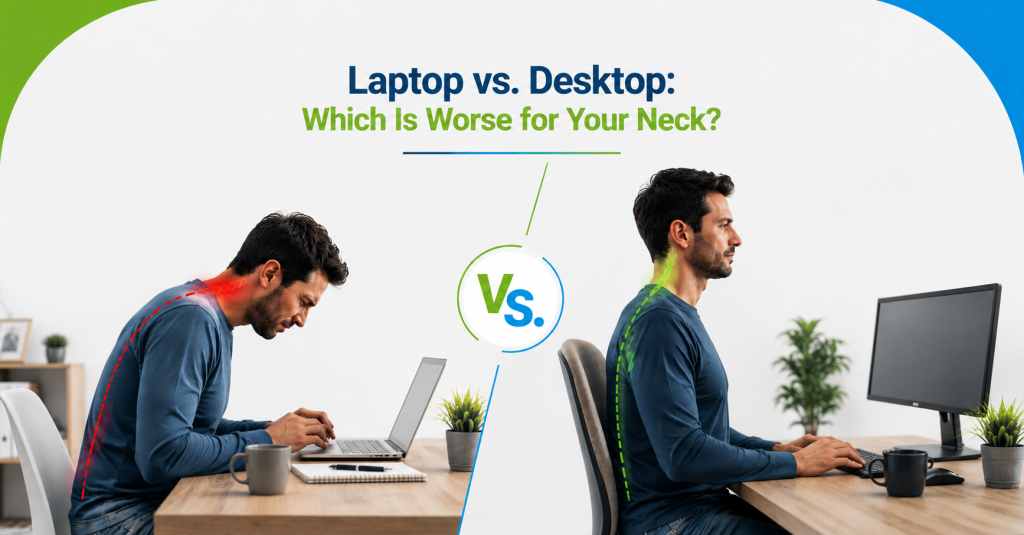
If you’ve ever finished a long day on your laptop and felt your neck aching more than usual, you’ve probably wondered whether it’s the device itself causing the problem. At Meade Chiropractic, this is a question we hear often, especially from patients who’ve switched between laptops and desktops and noticed a real difference in how their neck feels afterward.
The short answer is that both can strain your neck, but they tend to do it in different ways, and one is generally more forgiving than the other. Let’s break down exactly how laptops and desktops affect your neck, and which setup gives you the better chance at avoiding pain.
Why This Question Matters for Your Neck Health
Your neck, or cervical spine, is designed to support your head in a fairly neutral position. Every inch your head tilts forward or down adds significant extra load on the muscles and joints in your neck. Since laptops and desktops position your screen differently by default, the device you use daily plays a real role in how much strain your neck absorbs over time.
How Laptops Affect Your Neck
Fixed Screen and Keyboard Positioning
A laptop’s screen and keyboard are permanently attached to each other, which means you can’t adjust one without affecting the other. If the keyboard is at a comfortable typing height, the screen usually ends up too low, forcing your neck to bend downward for extended periods.
Encourages “Tech Neck” and Forward Head Posture
Because laptop screens sit lower than eye level by design, laptop use is one of the most common contributors to forward head posture, sometimes called “tech neck.” Over hours of daily use, this repeated downward angle places sustained strain on the muscles and joints in your cervical spine.
Poor Trackpad and Wrist Ergonomics
Using a laptop’s built-in trackpad often means keeping your wrist and forearm in an unsupported, awkward position. While this mainly affects the wrist and shoulder, the resulting shoulder tension frequently carries up into the neck as well.
How Desktops Affect Your Neck
Monitor Height Can Still Be Wrong
Desktops separate your screen from your keyboard, which is a real advantage, but only if the monitor is actually positioned correctly. A monitor sitting too low, too high, or too far away can cause just as much neck strain as a laptop if it isn’t adjusted properly.
More Ergonomic Potential, But Only If Set Up Correctly
The biggest advantage of a desktop setup is flexibility. You can independently adjust your monitor height, keyboard position, and mouse placement to fit your body, something a laptop simply can’t offer on its own. The catch is that this potential only helps if you actually take the time to set it up correctly.
Dual Monitor Setups and Neck Rotation
Desktop users with dual monitors sometimes create a different problem: repeatedly turning the neck to one side to favor a “primary” screen. Over time, this can create the same kind of one-sided strain we’ve discussed in other posts about the body favoring one side.
Laptop vs Desktop: Which Is Actually Worse?
In most cases, laptops are more likely to cause neck strain simply because of their fixed design. Even a mindful laptop user is fighting against a screen that’s inherently too low. Desktops, on the other hand, have the potential to be far more neck-friendly, but only when set up thoughtfully. In other words, it’s less about which device you own and more about whether your specific setup supports a neutral neck position. A poorly set up desktop can be just as harmful as a laptop, while a well-adjusted laptop setup, especially with an external keyboard and monitor stand, can significantly reduce strain.
Common Mistakes People Make With Either Setup
- Using a laptop directly on your lap or a low surface. This makes the screen even lower than usual, worsening the downward neck angle.
- Never adjusting monitor height on a desktop. Many people leave their monitor at whatever height it arrived at, rather than raising it to eye level.
- Ignoring external keyboards and mice. Adding these to a laptop setup is one of the simplest ways to improve posture, yet it’s frequently overlooked.
- Ignoring how far away the screen sits. A screen positioned too close or too far forces subtle but repeated neck strain to read it clearly.
- Assuming a bigger monitor automatically means better ergonomics. Screen size doesn’t matter nearly as much as correct height and distance.
Practical Tips to Protect Your Neck Regardless of Device
Raise Your Screen to Eye Level
Whether you’re using a laptop or desktop, your screen’s top edge should sit roughly at eye level. For laptops, a stand or a stack of books can accomplish this instantly.
Use an External Keyboard and Mouse
Pairing a raised laptop screen with an external keyboard and mouse lets you achieve proper screen height without sacrificing a comfortable typing position, essentially giving you the best of both setups.
Take Regular Neck and Shoulder Breaks
Regardless of your device, extended static positioning is hard on your neck. Standing, stretching, or simply looking away from the screen every hour helps reduce cumulative strain.
Position Dual Monitors Correctly
If you use two monitors, center them as evenly as possible in your field of view, or make sure your primary monitor sits directly in front of you rather than to one side, to avoid repeated neck rotation.
When to See a Chiropractor for Neck Pain
If neck pain has become a regular part of your workday, especially if it’s worse after long screen sessions or comes with headaches or shoulder tension, it’s worth having your setup and your spine evaluated together. Adjusting your workspace alone isn’t always enough if an underlying misalignment has already developed, something we touched on in our post about the biggest work-from-home mistakes that hurt your spine.
How Chiropractic Care Helps
Chiropractic care can address both sides of this issue, the habits contributing to neck strain and the physical effects those habits have already caused. Through spinal manipulation, a chiropractor can correct cervical misalignments that build up from prolonged forward head posture, whether that’s from a laptop, a poorly set up desktop, or both. Ongoing posture exercises and stretches can also help retrain your neck and shoulders to hold a healthier position throughout the day, not just during a scheduled break.
Dr. Brandon Meade works with patients throughout Highland Heights, and Erlanger, along with the broader Alexandria areas, helping remote and hybrid workers figure out whether their setup, their device, or both are contributing to their neck pain.
Frequently Asked Questions
Is a laptop really worse for my neck than a desktop?
Generally, yes, mainly because a laptop’s fixed screen and keyboard positioning makes it harder to maintain a neutral neck position without additional accessories.
Can I make my laptop as neck-friendly as a desktop?
Yes, by raising the screen to eye level with a stand and pairing it with an external keyboard and mouse, you can achieve a setup very similar to a well-adjusted desktop.
Does monitor size affect neck strain?
Not as much as monitor height and distance. A large monitor positioned too low can still cause the same forward head posture as a small one.
How do I know if my neck pain is coming from my screen setup?
If your neck pain consistently worsens during or after screen use and improves on days with less screen time, your setup is a likely contributing factor.
Can dual monitors cause neck problems?
Yes, particularly if you consistently favor one screen over the other, which can create repeated, one-sided neck rotation over time.
Contact Meade Chiropractic
Florence KY Chiropractic Office
Call: 859-640-6770
Highland Heights KY Chiropractic Office
Call: 859-441-8181
Final Thoughts
Neither laptops nor desktops are automatically bad for your neck, but laptops make good posture harder to achieve without a few simple adjustments. The real factor isn’t the device itself, it’s whether your screen, keyboard, and mouse are positioned to support a neutral, comfortable neck position throughout your day.
If neck pain has been showing up more often than it should, take a closer look at your setup, laptop or desktop, and consider whether a proper evaluation could help identify what’s really going on.
Summary
Laptops tend to be worse for the neck than desktops because their fixed screen and keyboard force a lower, downward head angle, contributing to tech neck. Desktops offer more ergonomic flexibility but only help if the monitor is properly positioned. Raising screens to eye level and using external keyboards can protect the neck with either device.